
DMX Core 100 — What's New
DMX Core 100 has had a packed few months of releases, and two developments in particular are worth your attention
The latest features and improvements (October 2025 – March 2026)
Hi there,
DMX Core 100 has had a packed few months of releases, and two developments in particular are worth your attention: a brand-new Timeline Editor for visually building lighting sequences, and full multi-platform support so you can run DMX Core on Windows, macOS, or Linux — no hardware required. Here's a closer look.
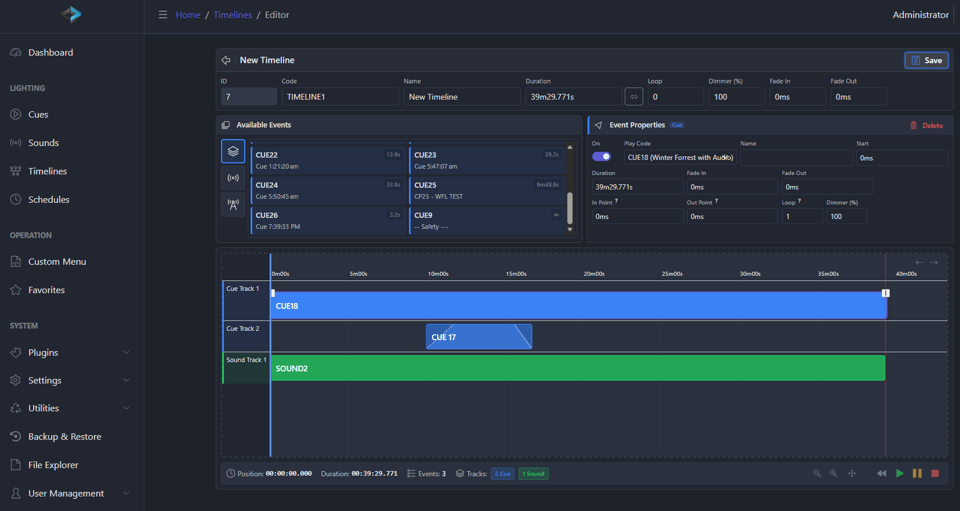
Spotlight: Timeline Editor
The most significant addition to DMX Core 100 in this release cycle is the Timeline Editor, which entered beta in December 2025 and has been steadily refined since.
Instead of programming cues one at a time, the timeline editor lets you visually compose and arrange entire lighting sequences on a familiar timeline interface. You can see your full show laid out, drag elements into place, and fine-tune transitions — a more intuitive creative workflow for complex multi-cue shows.
Recent updates have added seek and scrub so you can jump to any point in a sequence instantly, loop sections for rehearsal or repeating effects, and general editing improvements that make the whole experience smoother. Whether you're building an architectural lighting program or a dynamic show for a live venue, the timeline editor changes how you work with DMX Core 100.
Timeline Editor releases:
- Dec 9, 2025 — Timeline editor enters beta
- Jan 30, 2026 — Seek/scrub and loop functionality added
- Feb 3, 2026 — Editor workflow improvements
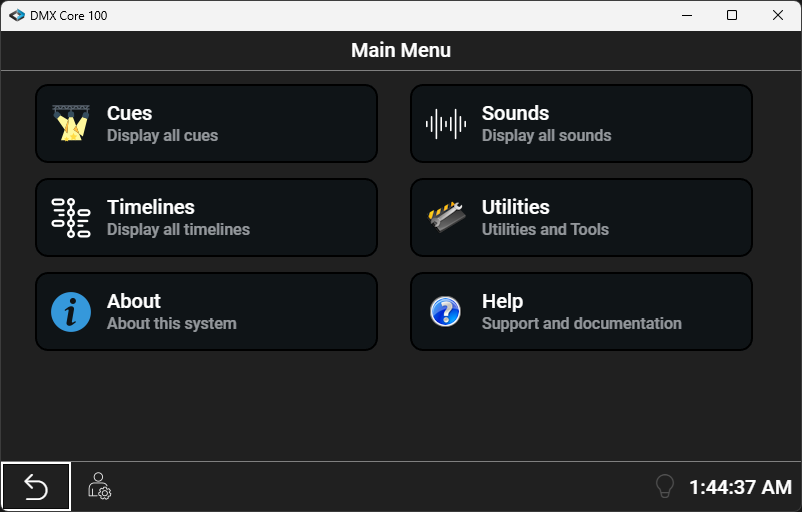
Spotlight: Run DMX Core on Any Platform
As of March 2026, DMX Core 100 runs natively on Windows, macOS (Apple Silicon and Intel), and Linux (Snap) — the same full-featured software that powers the hardware controller, right on your computer.
This means you can pre-program and test shows on your laptop before deploying to the wall-mounted unit, or run DMX Core as a standalone software controller with no hardware at all. A free demo mode lets you evaluate the full feature set (with a brief output pause every 16 minutes), so you can try before you buy.
| Platform | Architectures |
|---|---|
| Windows 10/11 | x64 |
| macOS | Apple Silicon (ARM64) and Intel (x64) |
| Linux | x64 and ARM64 (RPi) via Snap |
Download the free demo today →
More Highlights
Beyond the two marquee features above, here's what else shipped in the last six months:
Stream Deck Support (Jan 23) — Elgato Stream Deck integration with pan, mute, and configurable actions for tactile, one-touch show control.
Device Scanning (Feb 10) — Automatically discover connected devices during setup, so you spend less time on manual configuration.
Audio Delay (Nov 14) — Sync audio playback with your lighting cues for perfectly timed shows.
Cue Fade Mask Editor (Nov 12) — Define which channels are affected by fade transitions, now editable directly in the web UI.
Dimmer Settings for Cues & Schedules (Nov 11) — Set intensity levels directly on cues and schedules without creating extra cues.
Mobile Web UI Improvements (Nov 15) — Monitor and control shows from your phone or tablet with an improved mobile interface.
Dashboard Favorites & Custom Menus (Oct 17) — Pin your most-used cues and controls to the dashboard for instant access.
Playback Scrub & Pause (Oct 6) — Stop and navigate through running sequences for rehearsal and troubleshooting.
FLAC Audio Import (Oct 13) — Lossless audio support alongside existing formats, plus automatic cleanup of deleted files.
Custom Menu Styling (Oct 25–31) — Background colors, glow state indicators, and fade timing controls in the web UI.
DMX Core 100 is a standalone lighting controller with a 4.3" touchscreen that mounts in a standard 2-gang electrical box, or with a 7" touchscreen for desktop or embedded applications. It records and plays back up to 200 universes of dynamic DMX at 40 Hz, with audio playback synchronized to your lighting. Control it from the touchscreen, web UI, schedules, or external triggers (HTTP, OSC, UDP, TCP, MQTT, DMX) — plus Stream Deck and mobile.
It supports sACN, ArtNet, KiNet, and DMX-512, and now runs on Windows, macOS, and Linux as a pure software solution too. Starting at $799, it includes one year of remote cloud access and software upgrades.
View documentation → Purchase →
Already Own a DMX Core 100?
If you haven't updated in a while, now is a great time. The timeline editor alone is a reason to check out the latest firmware — it fundamentally changes how you build and refine shows. Update through the web UI or desktop software and explore what's new.
Thanks for reading, and happy lighting!

