
DMX Core 100 — Timelines That Wait For You
A short update on what's shipped since last time (late July – early August 2026)
Hi there,
Our last newsletter was a big one. This one is deliberately smaller — but there are a few additions worth knowing about, especially if you run interactive installations or a smart home alongside your lighting.
Hold milestones: pause a timeline until something happens
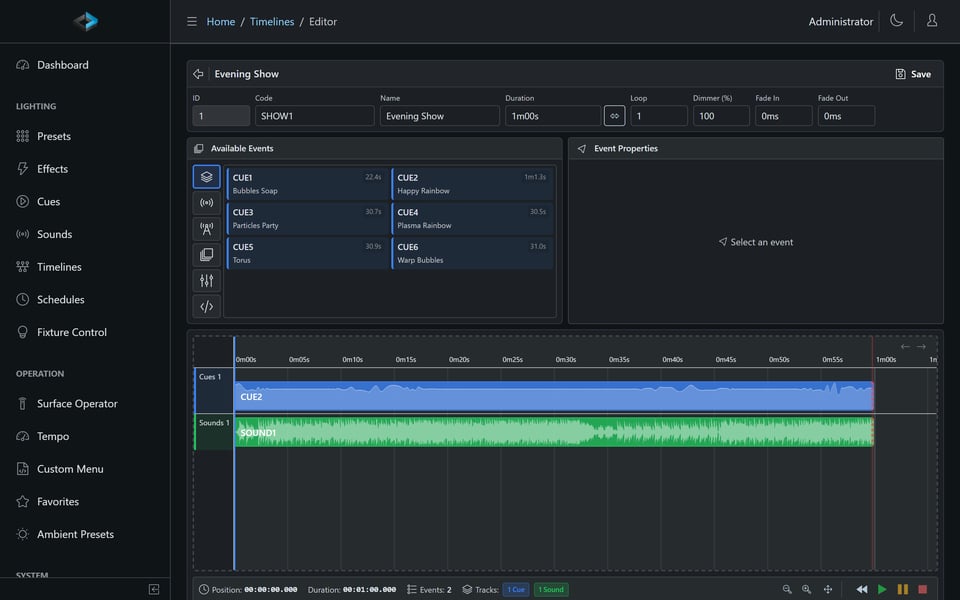
Timelines have always run start to finish. Now they can wait.
Drop a Hold milestone anywhere on a timeline and playback pauses at that point — looping sounds keep looping, the lights hold their state — until a button release, another trigger, or a configurable timeout continues the show. A red HOLDING badge in the Web UI makes it obvious what the timeline is waiting for.
That small change opens up a lot. A museum exhibit can hold on an idle look until a visitor presses the button. A themed attraction can wait for the operator's go. A vending or payment-driven display can hold until the confirmation arrives, then run the sequence. Instead of scripting around the timeline, the timeline itself becomes interactive.
Cue and timeline loops are also seamless now — the blackout frame that used to sneak in at the loop point is gone, so continuous ambient content runs without a visible hitch.
Home Assistant, automatically
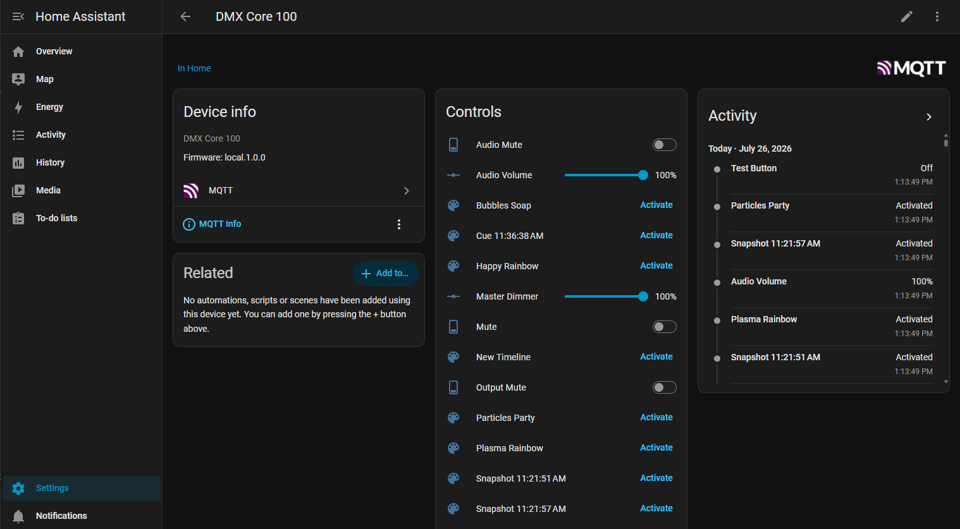
If you run Home Assistant, DMX Core 100 now shows up on its own. Point both at the same MQTT broker and the device is discovered within seconds under Settings → Devices & Services — no YAML, no custom configuration.
What you get out of the box:
- Scenes for your presets, cues, and timelines
- Sliders for master dimmer, zone intensities, and audio volume
- Switches for audio and output mute, plus schedule toggles
- Selects for selector controls, buttons for stop, and a Now Playing sensor
Everything updates in both directions in real time, so a change on the touchscreen shows up in Home Assistant and vice versa. The same discovery protocol also works with openHAB, ioBroker, and Domoticz.
Also new
Channel Rules (Aug 3) — Cap, scale, or copy (multipatch) DMX channels during playback without touching the recorded cue. Perfect for a fixture that turned out too bright on site, or for adding a new fixture that should mirror an existing one.
USB Wi-Fi adapter support (Jul 28) — Join a Wi-Fi network with per-adapter DHCP or static addressing. Device discovery on multi-adapter networks is more reliable too.
Plugin system (Jul 25) — DMX Core now supports uploadable plugins, with a public SDK for building your own. Several existing integrations have moved to this model, which means they can be updated independently of the core software.
Automatic database backup (Jul 26) — Your configuration is backed up and restored automatically as part of a software update.
Toggle Output (Jul 24–27) — Suppress all DMX output on demand, so a backup unit can take over cleanly during switchover. Available as a trigger action with explicit On / Off / Toggle options.
Trigger refinements (Jul 21–27) — External Trigger effect stepping, threshold-based input triggers, and more reliable Internet Passthrough.
Windows desktop (Jul 22–24) — Close to tray, and the option to start hidden in the system tray.
See the release notes for the complete list.
Already running DMX Core 100?
Update through the Web UI or desktop software — the update now backs up and restores your configuration for you. If you're new here, the free demo is full-featured with no signup and no expiration.
Read the docs → Visit dmxcore.com →
Thanks for reading, and happy lighting!

