DMX Core has a new home — and a big wave of new features
Control fixtures directly, react to live audio, script anything, and scale to 800 universes.
DMX Core 100 — A New Home and a Wave of New Features
The latest news and improvements (March – July 2026)
Hi there,
Big news since our last update: DMX Core has a brand-new website at dmxcore.com — a proper home for the whole platform. And under the hood, the last few months have been some of the busiest yet. DMX Core 100 can now control your fixtures directly, react to live audio, run custom JavaScript automation, and push up to 800 universes — and you can reach it securely from anywhere. Here's what's new.
Introducing the new dmxcore.com
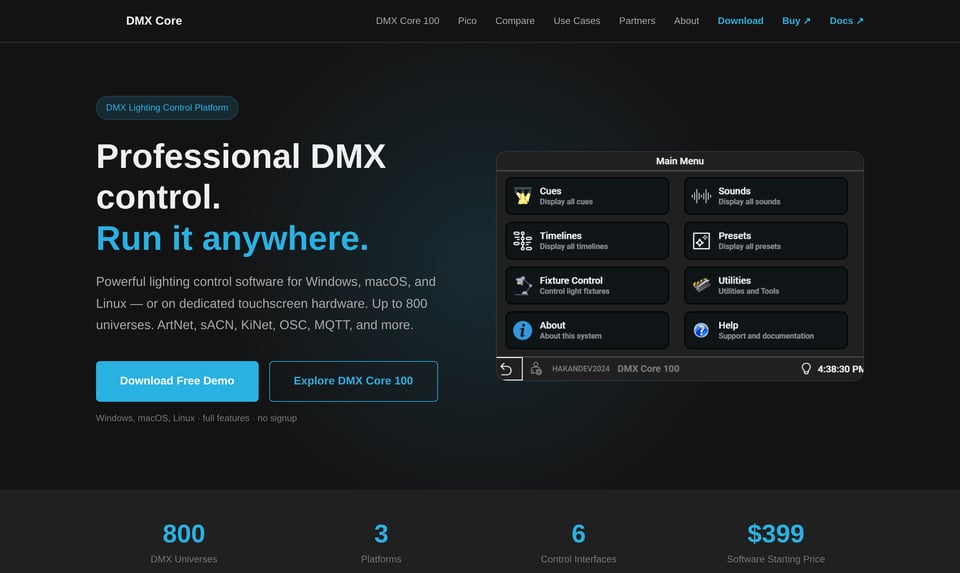
The new site reflects how far DMX Core has come. It's no longer just a wall controller — it's a professional DMX lighting control platform that runs as desktop software on Windows, macOS, and Linux, or on dedicated touchscreen hardware. Same software, your choice of deployment.
You'll find dedicated pages for the DMX Core 100 and the DMX Core Pico 2 (in stock and now with a proper home on the site), a side-by-side competitor comparison, a complete feature list, and a free demo download — full features, no signup.
Spotlight: Control your fixtures directly — no console required
 Historically, DMX Core 100 shined at recording and playing back shows from an external console. Now it can be your primary controller too. Straight from the Web UI you can:
- Set up fixtures — import profiles from Lightkey, Daslight, and now GDTF libraries, or have a profile generated by AI straight from the fixture manual. Multi-function fixtures (dual color wheels, multiple gobos) are supported — just pick the personality that matches your fixture.
- Organize into zones — group fixtures by room, stage area, or type, and apply presets and effects per zone.
- Build presets — real-time color, dimmer, and position control, saved as reusable scenes with copy/paste, favorites, and duplication.
- Run built-in effects — Breathing, Chaser, Crackling, Fire, Flickering, Full Sinus, Lightning, and Pulse, each with configurable speed and intensity, and assignable at any level — global, zone, or individual fixture.
- Go audio-reactive — new audio-reactive effects let your lighting respond to live sound, so a room can pulse and move with the music, no external console needed.
This is a genuine shift: you can now program a complete show without ever touching an external desk.
Spotlight: Automate anything with JavaScript
For installations that need custom logic, DMX Core 100 now includes a full JavaScript scripting engine. Write scripts to play cues, apply presets, set fixture colors, drive DSP control values, and publish OSC or MQTT messages — then run them from input triggers, schedules, timelines, button presses, or lifecycle events.
It ships with a built-in web editor with test payloads, run history, and logging, plus a persistent state store that survives reboots. Everything runs sandboxed with hard limits, so a runaway script never affects your live playback.
Scheduling got smarter too: schedules can now start or end at sunrise or sunset with a configurable offset based on the device's location — ideal for retail façades and outdoor installations that should follow the daylight.
Spotlight: Bigger reach, more scale
DMX Core 100 now goes further in every direction:
800 universes. A major playback performance boost means the platform now streams up to 800 universes at 40 Hz (or 600 at 60 Hz) over the network — room to grow into the largest multi-universe installations.
Cloud Tunnel gives you secure remote access to the Web UI from anywhere — no VPN, no port forwarding, with automatic reconnect. Manage your whole fleet from portal.dmxcore.com: monitor device health, open the Web UI remotely, reboot or back up units, and push updates. One year of cloud access is included.
Control Surfaces bring tactile control to the platform. Alongside expanded Elgato Stream Deck support (including the Stream Deck Plus and Dock), DMX Core added OSC control surfaces with two-way feedback, MIDI over the network (rtpMIDI and Network MIDI 2.0), and a Control Surface editor with operator view, flash mode, and takeover handling — reliable, physical access to cues, presets, and timelines for live operators.
More highlights
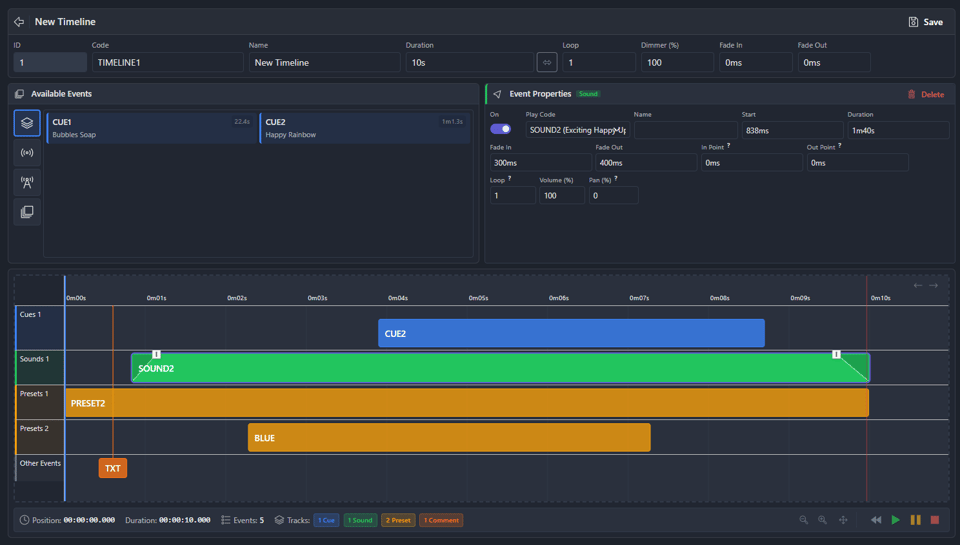
Richer timelines (Jul 10) — Audio waveform overlays and cue intensity profiles make the timeline editor more precise than ever.
Control Values (Jul 14) — Connect Symetrix/Q-SYS DSP audio levels to faders, custom menu sliders, control surfaces, triggers, and timelines, with smooth timed level ramps.
Playback Layers & merge mode (Jun 28) — Per-cue concurrency control for layering playback exactly how you want it.
DMX Core Connect (Jul 8) — A new desktop app that gives an offline unit internet access through a computer on the same network.
Output Monitor (Apr 8) — Real-time visualization of every DMX channel, so you can see exactly what's going out on the wire, plus fixture CSV/Excel export.
Ambient presets (Apr 2) — Set a persistent fallback preset that activates automatically whenever nothing else is playing.
RDM & device monitoring (May–Jun) — RDM device status over Art-Net, a new Device Status page, and electrical monitoring (voltage, current, temperature) on supported devices.
Advatek integration (Apr 9) — Auto-discover Advatek PixLite pixel controllers with one-click Art-Net/sACN setup and live temperature, voltage, and current monitoring.
See the full feature list or the release notes for everything.
New to DMX Core 100?
DMX Core 100 is a professional DMX lighting control platform that runs as desktop software on Windows, macOS, and Linux, or on dedicated 4.3" and 7" touchscreen hardware. It controls up to 800 universes (at 40 Hz), speaks ArtNet, sACN, KiNet, DMX-512, USB DMX, and TPM2.net, and integrates with OSC, MQTT, REST API, MIDI, Q-SYS, Symetrix, and Stream Deck. Record shows from an external console or program fixtures directly, then automate everything with schedules, triggers, JavaScript, and the visual timeline editor.
Software licenses start at $399 (Basic) and $599 (Full); dedicated hardware starts at $999. You can start with software and add hardware later — or the other way around. Try it free in full-feature demo mode, no signup and no expiration.
Download the free demo → View documentation → Buy now →
Already own a DMX Core 100?
If it's been a while since you updated, now is the time. Direct fixture control, audio-reactive effects, JavaScript automation, 800-universe output, and Cloud Tunnel together change what the device can do — many installs that used to need an external console can now run entirely on DMX Core. Update through the Web UI or desktop software and take a look.
Thanks for reading, and happy lighting!

