DMX Core 100: control systems and integration
DMX Core 100: control systems and integration
Part of What's new in DMX Core 100 - August to October 2026
Knobs, buttons, DSPs, scripts and cues now agree on what the lights are doing.
Q-SYS, Symetrix and Control Values
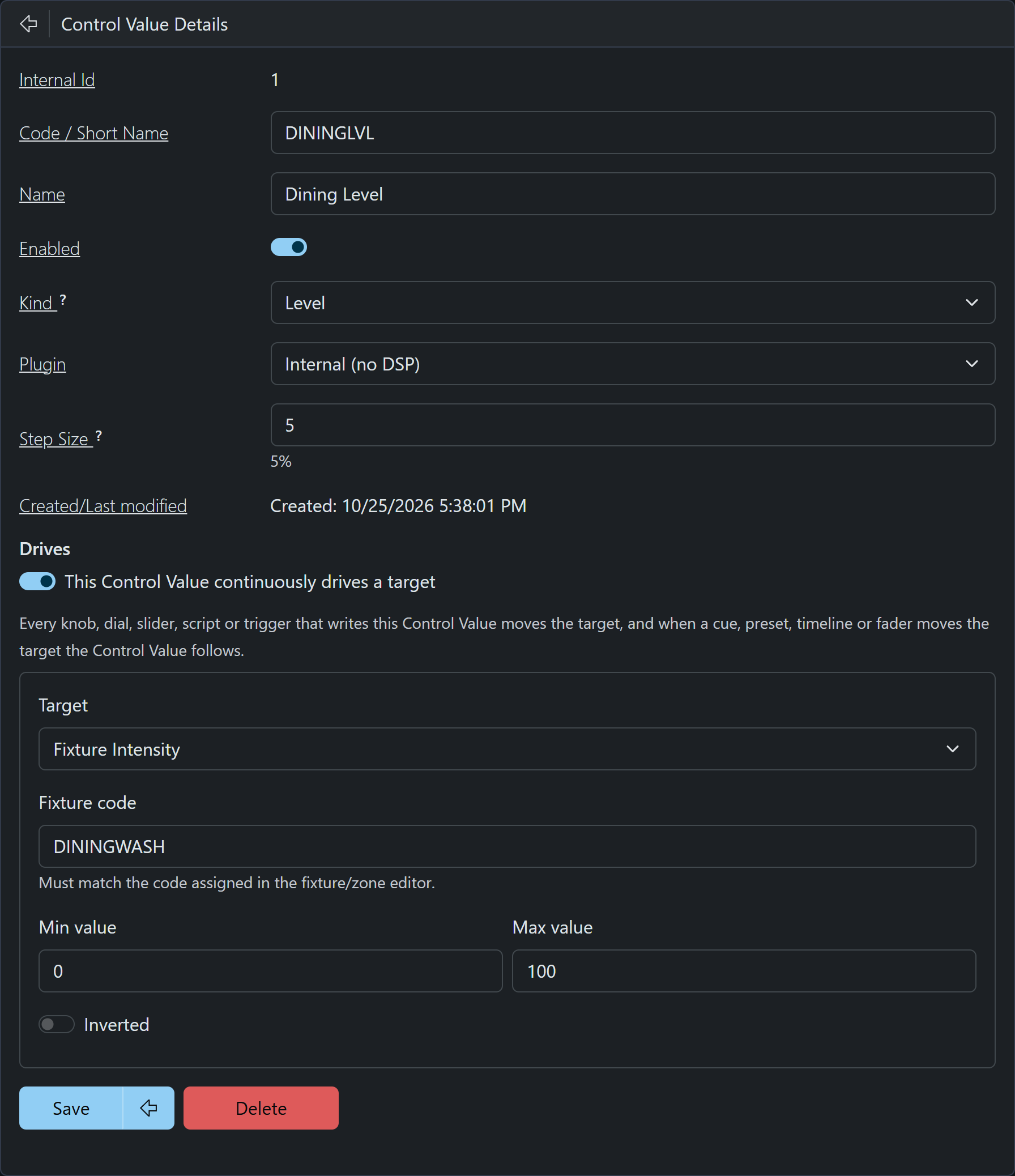
Control Values, rebuilt (Sep 16).
- Control Values no longer need a DSP. Choose Internal (no DSP) and the device holds the value itself, saved across a restart.
- A Level Control Value can drive a fixture intensity, zone, master, volume or color channel. A MIDI knob, a Stream Deck dial, a custom menu slider, a script and a Symetrix wall knob can all control one light.
- When a cue or fader moves that light, the Control Value (and the DSP knob) follows, so nothing jumps on the next touch.
- New Counter kind (min, max, step, optional wrap-around) for scoreboards and queue numbers.
- A Controls view on the Faders page with a strip per Level Control Value.
- Custom menu Value display - a live, read-only readout of any Control Value (a score, a volume, an on/off state) on the touchscreen and in web menus.
- Control Value triggers now fire on any change, not only changes from the DSP side.
TouchOSC and OSC (Sep 27 - Oct 18)
- Built-in addresses read buttons the way QLab and Eos do (fire on press, ignore the
0on release), so a cue plays once per tap. - A panel subscribes itself with
/dmxcore/hello. Any sender that wakes up after a minute of silence gets the full status: playing flags, active cues, timelines and sounds, and Control Value levels. - Buttons light back up with the item's active state when your finger lifts. Toggle Control Values flip from a single button, and
/dmxcore/fadetimegives each panel its own fade-time fader.
Control your lights from TouchOSC (video) - cue and preset buttons, a master fader and live feedback. Reference: OSC docs and Play a Cue over OSC.
Integration API (Sep 5-17)
A versioned HTTP + WebSocket interface for control systems such as Bitfocus Companion, Crestron and Node-RED.
- List cues, presets, zones and Control Values, and execute them (with loop and fade options).
- Live state pushed back for button feedback.
GET /inforeturns a health snapshot for monitoring. - Output events too: a Digital Output becomes a switch that Home Assistant or a Companion button can turn on, off, toggle or pulse.
- Enable it under Device > System and issue an Integration-only API key.
The Bitfocus Companion module, built on the Integration API, is available now, so you can put DMX Core cues and presets on the same Stream Deck as the rest of your show.
Home Assistant output events (Aug 15) - fire Home Assistant scenes, scripts and automations from control surfaces, menus, triggers, timelines and scripts.
MCP server (Aug 26) - AI clients such as Claude Desktop and Cursor can list entities, play cues, adjust levels and drive fixture colors over the Model Context Protocol, secured with MCP-only API keys.
Stream Deck (Sep 16 - Oct 19)
- Keys bound to a Control Value show the live value and light while a Toggle is on.
- On a Stream Deck +, the LCD strip shows each dial's label and value, and dials step a Counter or Selector one click at a time.
- A built-in set of 60 icons to pick from in the Web UI.
Relays and contact inputs (Sep 16-21)
- A Digital Output can be set on, set off, pulsed or made to follow a key, trigger or contact, so a held button keeps a relay closed exactly as long as it's held. Configurable pulse width, and an Inverted switch for normally-closed wiring.
- ADIO digital inputs see both edges, so a contact closure can release a Flash preset or a momentary timeline.
- New DMX Channel output event holds channels on top of whatever is playing, e.g. a smoke machine's fog and fan channels, or a work light that ignores Blackout.
Stop, Blackout and Output Off (Sep 7-8)
- Stop ends everything and returns the room to its ambient look.
- Blackout is a latched switch, like the key on a console: every channel to 0% and audio muted while everything keeps running underneath.
- Toggle Output off keeps the unit silent until it's switched back on.
- Hold to confirm protects these buttons: a sweeping ring on Stream Deck, blinking pads on KD-WP8 and LPD8 mk2, Yes/No in the browser.
Upgrading? Up / Down step 1 now means 1% (use 100 for full), and OSC fade time, loop count and step moved to /fade, /loop, /step. Details in the main post.
Other topics: Protocols - Programming and setup tools

